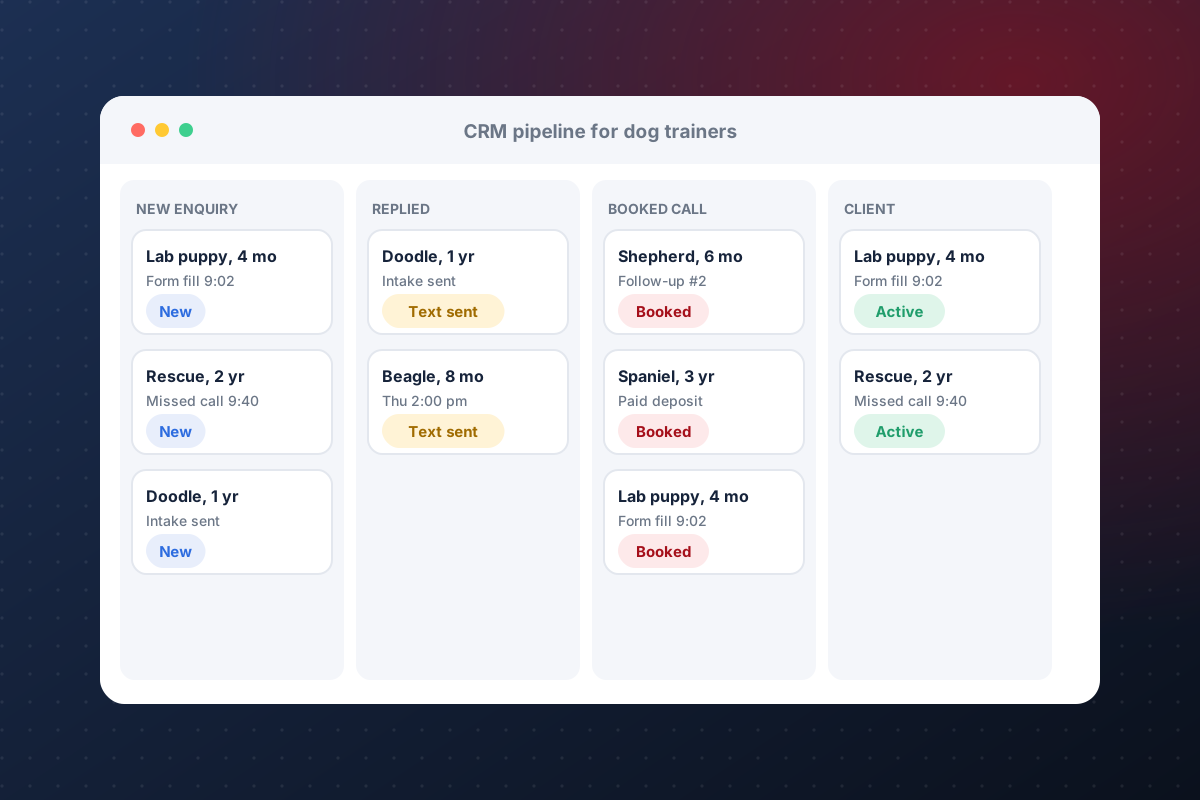
Website forms and your Google Business Profile feed new inquiries into one pipeline, so no lead sits in an inbox.
CRM for dog trainers
Dog training CRM: what to look for, what it costs and how to set it up
A dog training CRM keeps every lead, client and dog in one place and follows up for you. There is no single best CRM for every trainer. The right one depends on how you get leads, how you sell programmes and how much setup you will maintain. This guide covers the features that matter, a follow-up sequence that books clients, the real cost, and a 30-day setup plan.
What to look for
Eight things a dog training business needs from a CRM
A plain contact list is not enough. Dog training runs on follow-up speed, packages, bookings and a record for each dog.
Automatic text and email replies within minutes, plus reminders when a lead goes quiet.
A calendar clients can book from, with deposits collected up front to reduce no-shows.
Owner contact details alongside the dog's goals, notes, homework and history.
Track sessions used, packages ending and clients due to renew, before they drift away.
See every lead from inquiry to discovery call to enrolled client, and who owns each one.
Trainers see their own clients and tasks; the owner sees everything.
Know which channels (Google, referrals, social) produce clients you keep, not just leads.
What is a dog training CRM?
CRM stands for customer relationship management. A dog training CRM stores client information, tracks every lead and sends follow-up for you. It is the one place that knows who called, who booked and who is about to renew.
A dog trainer CRM goes one step further. It tracks the dog as well as the owner. It understands packages, session counts and homework. It treats a lead who texts at 9 pm very differently from a client who is mid-programme.
How a dog trainer CRM works day to day
Lead management
Leads arrive from your website, Google Business Profile, Instagram, referrals and the phone. A CRM pulls them into one list and shows where each one stands. Every lead gets an owner and a next step. Nothing sits unanswered in a text thread.
Follow-up that runs on its own
Speed wins dog training leads. The first trainer to reply usually gets the call. A CRM sends a text and email within minutes, then keeps following up if the lead goes quiet. You step in when someone replies.
Reviews and referrals
A CRM can ask for a Google review after a good session, while the client is still happy. It can also ask happy clients for referrals. Reviews help you rank in local search and give new leads a reason to trust you.
One inbox for client communication
Calls, texts and email land in one place with the full history. Two-way texting lets clients reply the way they already talk. Appointment reminders cut no-shows without anyone sending them by hand.
Sales pipeline
A pipeline shows each lead as a card that moves through stages: new inquiry, contacted, discovery call booked, enrolled. You can see where leads stall and which stage needs work. Over time it also shows how much revenue is likely to close.
Client information and relationships
Good client relationships come from remembering the details. A CRM keeps the dog's age, goals, behaviour notes, homework and past sessions next to the owner's contact details. Any trainer on your team can pick up where the last one left off.
A follow-up sequence that books clients
This is a simple sequence for a new inquiry. Most of it can run automatically.
- Within 2 minutes: a text that thanks them, names the dog and links to your calendar.
- Same day: an email with your programmes and a short note on how you work.
- Day 2: a text asking what behaviour they most want to fix.
- Day 4: a social proof email with a client result and a review.
- Day 7: a last check-in. If there is no reply, the lead moves to a nurture list.
- After booking: a confirmation, a deposit receipt and a reminder the day before.
What does a dog training CRM cost?
Costs fall into three parts. Check each before you compare tools.
- Software subscription: general CRMs often start under £80 a month. All-in-one platforms such as GoHighLevel cost more but replace several tools.
- Usage fees: texting, phone numbers and email sending are often billed on top.
- Setup and upkeep: a CRM only works once the forms, pipeline and follow-up are built. Doing it yourself costs time. Having it done for you is a one-time fee plus an optional monthly plan.
K9PN offers website and CRM setup, with monthly plans for ongoing updates. See the Website + CRM packages for current pricing. Always check each vendor's current price before you decide.
A 30-day CRM setup plan
- Week 1: list your lead sources and programmes. Build the pipeline stages. Import existing contacts.
- Week 2: connect your website form, calendar and Google Business Profile. Turn on instant text and email replies.
- Week 3: add packages, deposits and a per-dog record. Write the follow-up sequence above.
- Week 4: add review requests and renewal reminders. Test the whole flow with a fake lead. Train your team.
Questions to ask before you buy
- Can it track the dog as well as the owner, or only the person?
- How does it handle packages, session counts and renewals?
- Do text and email follow-ups run automatically, and who sets that up?
- How much setup does it need, and who maintains it after launch?
- What does it cost in month three and month twelve, including texting and add-ons?
- Can you export your data if you leave?
General-purpose CRM or dog-training software?
General-purpose CRMs are flexible and usually cheaper, but you build the dog-training workflows yourself. Software made for trainers fits faster but can be rigid when your business does something different, such as boarding plus virtual programmes.
K9PN uses GoHighLevel for CRM setup, so we are not a neutral reviewer. It handles contacts, calendars, forms and follow-up well once it is set up. A general CRM does not give you a dog-by-dog client portal, a trainer reply queue or an owner dashboard for capacity and renewals unless you build them.
Where custom software fits
Keep the CRM you have and add the dog-training layer on top: a client portal, a trainer queue and an owner dashboard that use your existing contacts, calendars and forms. See client portal software for dog trainers, GoHighLevel setup for dog trainers, dog training software or website and CRM setup.
Common questions
What is a dog training CRM?
A dog training CRM is software that keeps every lead, client and dog in one place, with automatic follow-up, booking and renewals. A dog trainer CRM is set up around how trainers sell programmes and packages, rather than being a plain contact list.
What is the best CRM for dog trainers?
There is no single best option. Pick the one that handles lead follow-up, booking with deposits, packages and renewals, and a record for each dog, and that you will actually keep set up. Test it with your real lead flow before committing.
Do dog trainers need a CRM at all?
If leads arrive by form, phone, text and social, a CRM keeps them in one place with follow-up reminders. Without one, leads and renewals tend to slip through the cracks.
Can I use GoHighLevel for a dog training business?
Yes. It covers contacts, calendars, forms, pipelines and automated follow-up, and it needs setup for packages and per-dog records. K9PN sets it up for dog trainers and can add custom software on top.
How much does a CRM for dog trainers cost?
Expect a monthly subscription, usage fees for texting and email, and either your own setup time or a one-time setup fee. General CRMs often start under £80 a month, and all-in-one platforms cost more. Compare the total cost in month three and month twelve, not just the sticker price.
Can a CRM replace my spreadsheet and my calendar?
Yes. A CRM holds your contacts, notes and bookings, and it follows up automatically, which a spreadsheet cannot do. Most also include a booking calendar, so clients can schedule without phone tag.
How long does it take to set up a dog trainer CRM?
A basic setup with a pipeline, a website form, a calendar and instant follow-up can be done in about a week. A full build with packages, per-dog records, review requests and renewal reminders usually takes three to four weeks.
When do I need custom software instead of a CRM?
When you need things a CRM does not do well: a client portal with homework and video uploads, a trainer reply queue, or an owner dashboard for capacity and renewals. Start with the CRM and add software when a specific bottleneck shows up.
Not sure which setup fits your business?
Tell us how you get leads and sell programmes. K9PN will recommend the smallest setup that works.
Book a Build Call